
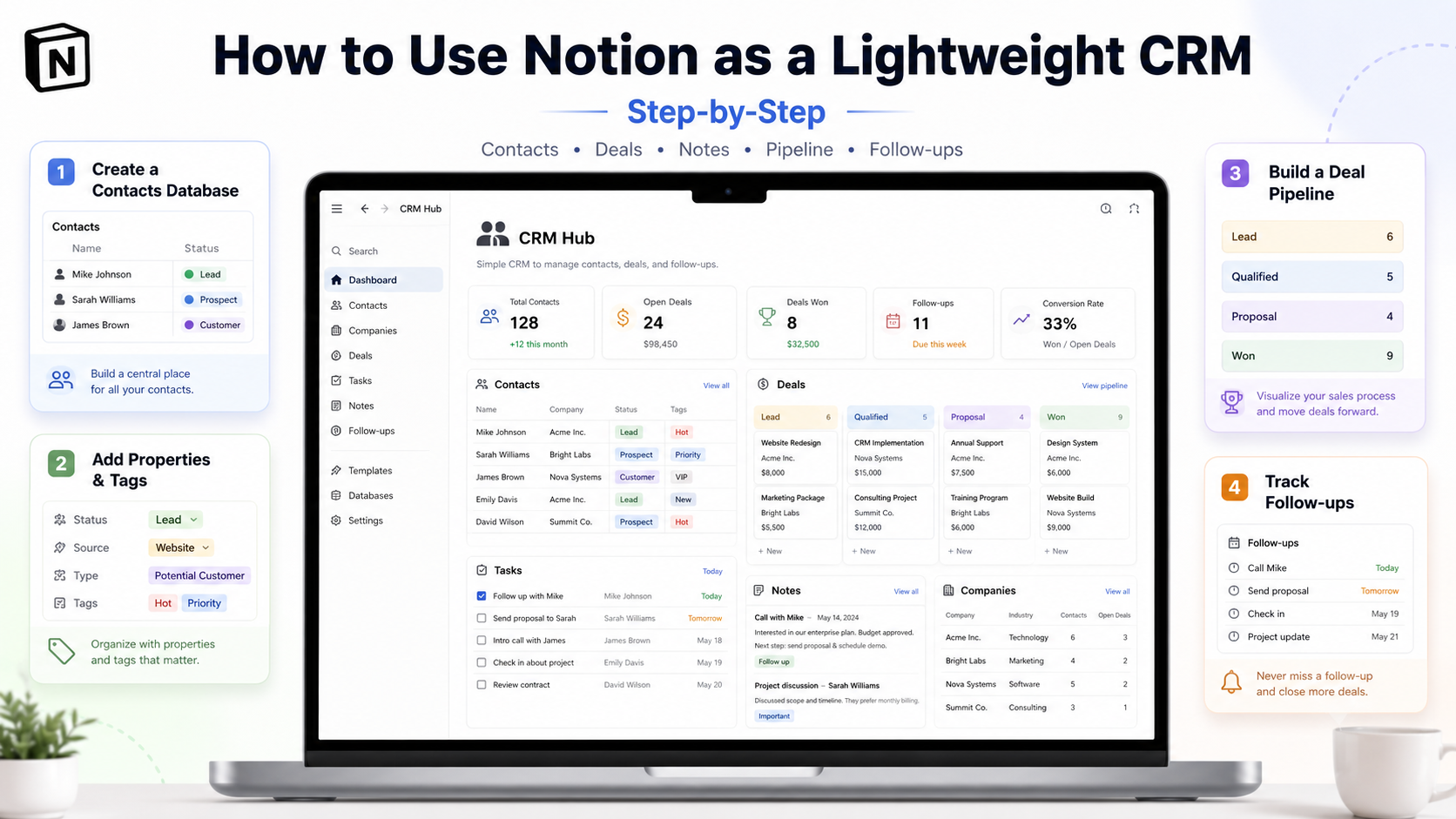
If your business has fewer than 200 contacts, a handful of active deals, and you don’t need email sequences or pipeline forecasting, you can absolutely run a Notion as CRM setup that beats a free Trello board and stays out of your way. This is the step-by-step guide for solo founders, freelancers, and small agencies who want to skip paying for a real CRM until they actually need one. We’ll cover the database structure that works, the setup walkthrough, automations that close the gaps, the real Notion cost at this scale, and the honest signals that tell you it’s time to migrate to a dedicated tool.
Important framing upfront: Notion is not a CRM, it’s a flexible database. The reason this works at all is that “lightweight CRM” for most early-stage businesses really means “structured spreadsheet with relations and views.” Notion does that beautifully. Where it stops working is at the moment you need bulk email, automated sequences, deliverability tracking, or sales-team reporting — and we’ll cover those breaking points honestly so you know when to stop pushing it.
Quick Answer: Does Notion Actually Work as a CRM?
For under 200 contacts, fewer than 50 active deals, and 1-5 users, yes — Notion handles the “track who’s who, what stage they’re at, what’s the next action” job well. You build 3-4 linked databases (Contacts, Deals, Activities, optionally Companies), set up filtered views (Pipeline kanban, Hot leads, Stale follow-ups), and you have a functional CRM in 30-60 minutes. It breaks down when you need any of: bulk email sequences, pipeline forecasting/reporting, deliverability tracking, native phone/email integration, or sales-team performance dashboards. For those, you need a real CRM — see our best CRM for small business roundup for graduation options.
The 4-Database Structure That Works
Every functional Notion CRM uses the same skeleton: four linked databases that mirror what dedicated CRMs do natively. Build these four and the relations between them, and 90% of the rest is configuration of views and filters.
1. Contacts (the people you talk to)
Properties to add: Name (title), Email, Phone, Company (relation to Companies database), Role/Title, Source (select: referral, website form, LinkedIn, event, cold outreach), Status (select: new lead, qualified, customer, churned), Last Contacted (date), Owner (person), Notes. The “Last Contacted” field is the single most useful thing here — it powers the “haven’t heard from in 30+ days” follow-up filter that prevents leads going cold.
2. Companies (organizations they work at)
Properties: Name (title), Industry (select), Size (select: 1-10, 11-50, 51-200, 200+), Website (URL), Country, Account Owner (person), Contacts (rollup from Contacts relation), Active Deals (rollup from Deals). Skip this database if you’re B2C — it adds setup complexity without value for individual consumer relationships. Keep it if you’re B2B and want to see all contacts at one company together.
3. Deals (the pipeline)
Properties: Deal Name (title), Value ($), Stage (select: discovery, proposal, negotiation, won, lost), Expected Close (date), Probability (number 0-100), Primary Contact (relation to Contacts), Company (relation to Companies), Owner, Next Step. The Stage property powers your Kanban Pipeline view — drag-and-drop deals between columns as they progress. Add a formula property “Weighted Value” = Value × Probability/100 for a forecast you can sum across the database.
4. Activities (everything that happened)
Properties: Activity (title), Type (select: call, email, meeting, demo, follow-up, task), Date, Contact (relation), Deal (relation), Owner, Outcome, Next Action. This is your audit trail — every call logged, every demo booked, every email sent gets a row here. It’s also what makes Notion feel like a CRM rather than a spreadsheet: open a contact and see every interaction in chronological order via the related rollup.
Step-by-Step Setup (30-60 Minutes)
Step 1: Create the parent page
In Notion, create a new page called “CRM” (or “Sales Hub” if you prefer). This becomes your home dashboard. Inside, add a simple table of contents you’ll fill in as you build: Contacts, Companies, Deals, Activities, Dashboard.
Step 2: Build the four databases
Inside the parent page, add four full-page databases (slash command: /database — Full page). Name them Contacts, Companies, Deals, Activities. Add the properties listed above for each. Don’t overthink select-option values yet — you can refine them as you go. Better to start with 5 statuses than 15.
Step 3: Connect them with relations
This is what makes it a CRM and not four spreadsheets. In Contacts, add a Relation property pointing to Companies. In Deals, add Relation properties to both Contacts and Companies. In Activities, add Relations to both Contacts and Deals. When you create a deal, you select the contact; opening that contact later shows all their deals via the auto-created backlink. This bidirectional link is the whole magic.
Step 4: Build the views you’ll actually use
For Deals, create a Kanban view grouped by Stage — this is your visual pipeline. Add a Table view filtered to “Stage = won OR lost” for the closed-deals archive. For Contacts, add a filtered view “Status = new lead AND Last Contacted < 30 days ago” — your follow-up queue. For Activities, a Calendar view showing meetings and calls in the next 14 days. Limit yourself to 4-6 views per database initially; you’ll add more as patterns emerge.
Step 5: Build a dashboard page
Create a “Dashboard” page in your CRM parent. Embed linked database views: Pipeline Kanban (Deals), Hot Leads (Contacts filtered to qualified status), Today’s Activities (Activities calendar), and a Pipeline Value sum (formula in Deals database, displayed via rollup or linked view). This is the page you open every morning — design it for that single use.
Adding Automation: Where the Real Power Comes In
Stock Notion alone is data entry-heavy. Layer in automation and you close most of the gap with a real CRM. Three approaches, used in combination:
Notion’s native automations (2026): Property-change triggers, scheduled triggers, button-triggered workflows. Useful for “when deal status changes to Won, create a follow-up task” or “every Monday at 9 AM, surface stale leads.” Setup is in the database’s automation panel — no external tool needed for basic flows.
External automation (Make.com or n8n): For everything Notion can’t do — pulling new leads from a website form into Contacts, sending email confirmations when a deal closes, posting to Slack on stage changes. The Notion API is well-documented; both Make and n8n have native Notion modules. Our roundup of Make and n8n automation tools covers the wiring patterns.
Notion AI on the Business plan ($20/user/month): AI fields that auto-populate based on rules (e.g., “Summarise the last 5 activities for this contact” as a property), AI-generated next-step suggestions, semantic search across your CRM. Honestly optional — at SMB scale you’ll get more value from external automation than AI inside Notion. We covered the trade-offs in our Notion AI vs ChatGPT breakdown.
If your CRM use case involves chat-based lead capture (Telegram, WhatsApp, website widget), you can wire those into Notion via a webhook layer — see our walkthrough of website-CRM-Telegram integration for the pattern.
Real Cost of Running a CRM in Notion
| Setup | Notion plan | Add-ons | Monthly cost |
|---|---|---|---|
| Solo, <100 contacts | Free Personal | None | $0 |
| Solo + Make.com | Free Personal | Make.com Core | ~$11 |
| 3-person team | Plus ($10/user) | Make.com Core | ~$41 |
| 3-person + AI | Business ($20/user) | Make.com Core | ~$71 |
| 5-person team | Plus ($10/user) | Make.com Pro | ~$66 |
For perspective: HubSpot Sales Hub Starter is $15/user/month with a 2-user minimum ($30/month floor). Pipedrive starts at $14/user/month. So solo and 2-person Notion setups are genuinely cheaper than dedicated CRMs. At 3-5 users the gap narrows. At 5+ users, dedicated CRMs often become cheaper-per-feature.
When You’ve Outgrown Notion as CRM
Honest signs that it’s time to migrate to a real CRM:
You’re spending more than 15 minutes/day on manual data entry. Real CRMs auto-log emails, calls, and meetings via integrations. Notion needs you to add Activity rows manually (or build complex automations). If you’re typing CRM entries for an hour daily, the time cost has exceeded the subscription cost of a real CRM.
You need pipeline forecasting your CFO will trust. Notion can sum weighted deal values, but it doesn’t do MEDDIC, BANT scoring, win-rate trends, or rep-vs-rep performance analytics natively. You’d be hand-building dashboards that any real CRM ships out of the box.
You want email sequences and deliverability tracking. Notion has no native email feature. You can compose an email in a page, but you can’t send 50 personalised follow-ups from it or see who opened what. This is the single biggest functional gap.
Your sales team is more than 3-4 people. Multi-user Notion gets expensive ($10-20/user/month), and the lack of role-based permissions, territory management, and lead-routing rules becomes a daily frustration. For graduation paths, our comparison of Pipedrive vs HubSpot for B2B covers the two most common landing spots. If you want a feature-rich all-in-one option, the ClickUp review covers its CRM module as part of a broader workspace.
Conclusion
Notion as CRM is genuinely good at one specific job: tracking under 200 relationships, fewer than 50 active deals, with 1-5 users, where context (notes, docs, decisions) matters more than outreach automation. Build the four-database skeleton, link them with relations, design 4-6 views you’ll actually use, and add Make.com or n8n for the gaps. Total setup time is an hour, ongoing cost is $0-40/month at small scale, and you defer the dedicated-CRM decision until you actually need one. The moment you hit the limits (bulk email, forecasting, team scaling), migrate — but until then, Notion saves you both money and the time of learning a tool you don’t yet need.
FAQ
Is Notion a real CRM?
No, Notion is a flexible database tool that can be configured to mimic a CRM. At small scale (under 200 contacts, under 50 active deals, 1-5 users), the difference doesn’t matter — you get most of what a real CRM offers. At larger scale, the absence of native email, pipeline forecasting, and team features becomes a real limitation.
How long does it take to set up a Notion CRM?
30-60 minutes from scratch for a working four-database setup with basic views. Add another hour for tuning views, building the dashboard, and setting up your first automation. Pre-built templates from the Notion marketplace cut this to 15-20 minutes but require unlearning template choices that may not match your workflow.
Can multiple users collaborate on a Notion CRM?
Yes — Notion supports multi-user editing with the Plus plan ($10/user/month) and up. Permissions are page-level rather than property-level, so any team member with access to the CRM page sees all data. For role-based restrictions (sales rep sees only their leads), Notion isn’t the right tool.
Can I send emails from Notion?
Not natively. You can draft emails in a page and copy them out, but Notion has no send, track, or sequence functionality. For email-driven CRM workflows, either connect Notion to your email tool via Make.com/Zapier, or use a dedicated email-CRM platform.
What’s the best free Notion CRM template?
Notion’s own Sales Pipeline with Automations template (free, in the official marketplace) is a solid starting point — it ships with the standard contacts/deals/activities structure plus buttons for repeating tasks. Community templates from OnePageCRM and Easlo are also strong. Most templates need customisation regardless, so start with the structure that’s closest to your workflow.
When should I migrate from Notion to a real CRM?
When you cross 200+ active contacts, 50+ active deals, 5+ team members, or your workflow becomes email-sequence heavy. Also: if you’re spending more than 15 minutes/day on manual data entry, or if your team has been asking for pipeline forecasting that Notion can’t do. These thresholds are guidelines, not hard rules — the right time to migrate is when the pain of staying exceeds the pain of switching.