
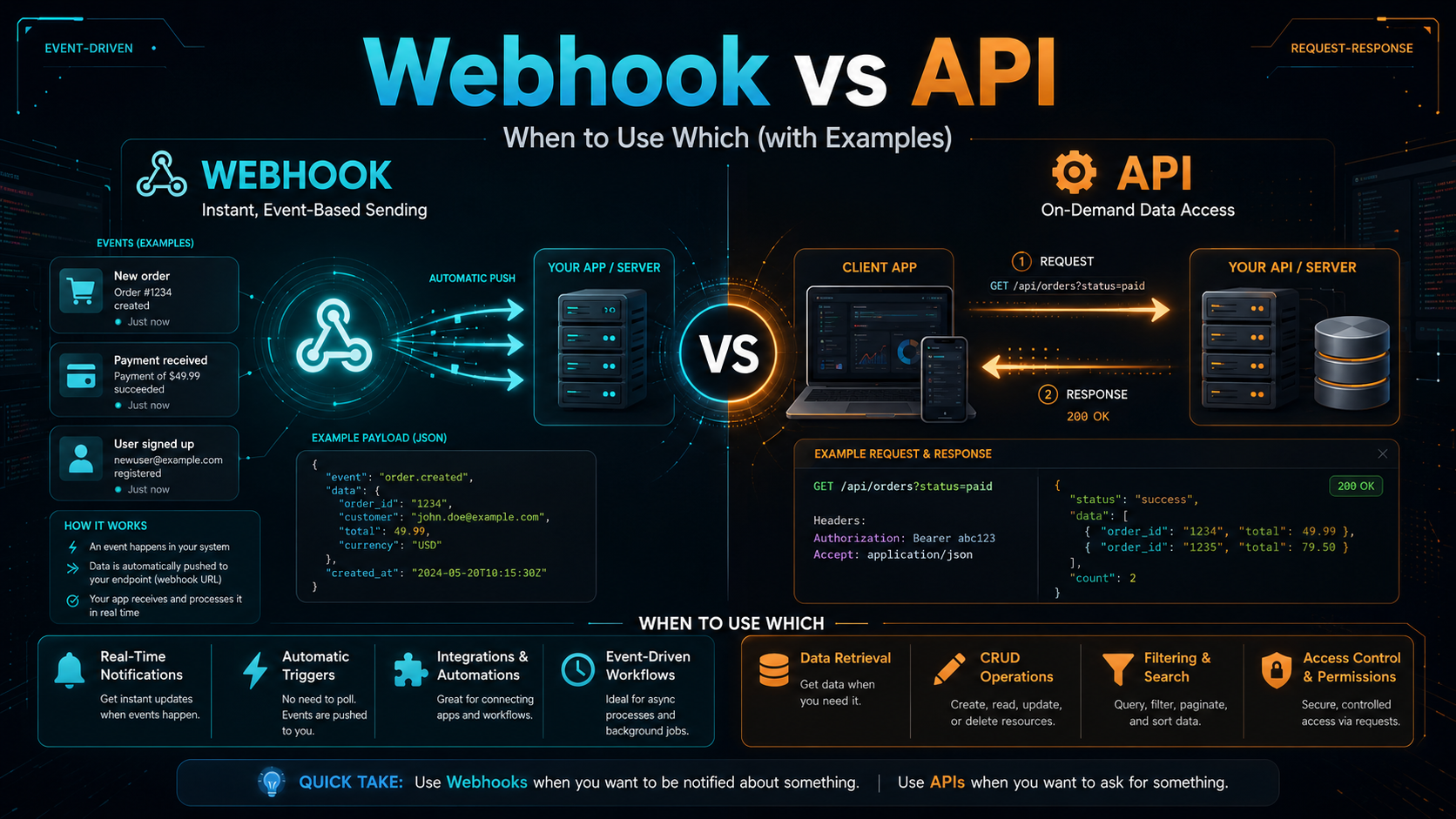
TL;DR: Use an API when you need to ask for something on your schedule — fetch a list of orders, push a new contact, look up a user’s plan. Use a webhook when you need to know something happened the moment it happens — payment cleared, customer signed up, deal stage changed. APIs are pull, webhooks are push, and most real integrations use both. This guide walks through the webhook vs API tradeoffs, the security gotchas, and four concrete examples (Stripe, Shopify, GitHub, Slack) so you can decide which one to reach for next time you wire two systems together.
This is for developers and technical folks at SMBs who are building integrations between SaaS tools — either through code or no-code platforms like Make and n8n. We’ll cover when each option is right, what breaks in production, and how to design a system that uses both without losing data along the way.
Quick Answer: API vs Webhook in One Paragraph
An API is a doorbell you press: your code makes a request, the other server answers with data. A webhook is a doorbell the other server presses on your URL when an event you care about occurs. APIs are great for predictable, on-demand work — listing products, looking up customers, updating records. Webhooks are great for real-time reactions — sending a Slack alert the second a Stripe payment succeeds, syncing a CRM the moment a form is submitted. Almost every production integration combines both: webhooks for events, APIs for everything else.
What an API Actually Is (in 2 Minutes)
Request-response, on your schedule
An API (Application Programming Interface) — in the context most marketers and devs mean it, a REST API — is a set of HTTP endpoints you call to read or write data. You send a GET, POST, PUT, or DELETE request; the server responds with JSON. You control when the call happens: every minute, every hour, on a button click. Nothing happens unless you ask.
The “pull” model
Because you initiate the call, APIs are a pull model. To stay current, you have to keep asking — a pattern called polling. Polling every 5 minutes means up to a 5-minute delay before you see new data. Polling every 10 seconds means 8,640 wasted calls a day if nothing changed, which is how rate limits get hit fast.
When you only have an API
If a service doesn’t offer webhooks, polling is your only option. To make it bearable, use exponential backoff, store an updated_at cursor so each call only fetches new records, and respect Retry-After headers. If you’re new to working with APIs without writing code, we have a roundup of no-code API tools and Postman alternatives that handle this pattern well.
What a Webhook Actually Is (in 2 Minutes)
Event-driven, on the other side’s schedule
A webhook is a URL on your server that another service calls when an event occurs. You register the URL in the provider’s settings, the provider stores it, and when a relevant event fires (new order, new signup, payment refund), the provider sends an HTTP POST to your URL with the event payload as JSON.
The “push” model
Webhooks invert the direction: the provider initiates the call to you. There’s no polling and no delay — the latency between event and notification is usually under 1 second. The cost is that you need a publicly reachable HTTPS endpoint that’s always up. If it’s down, the provider retries, but only a few times before giving up.
What a webhook is not
A webhook isn’t a separate protocol — it’s just an HTTP POST with a payload, sent to you instead of from you. Whoever calls “webhooks” a “different technology” is overcomplicating it. We have a separate deep dive on what a webhook is and how to test one with a sample handler if you want to go further.
Webhook vs API: Side-by-Side Comparison
The fastest way to internalise the difference is a side-by-side. The table below covers the seven criteria that matter most when picking one over the other for a real integration.
| Criterion | API (pull) | Webhook (push) |
|---|---|---|
| Direction | You → server | Server → you |
| Latency to new data | Depends on poll interval (1–15 min typical) | Under 1 second |
| Server resources | Wasted calls when nothing changed | Zero calls when nothing changed |
| Setup complexity | API key + scheduled job | Public HTTPS endpoint + signature verification |
| Reliability under outage | You retry whenever you want | Provider retries 3–10 times, then drops |
| Rate limits | Provider-imposed (e.g. 100/min) | Limited only by event volume |
| Best for | Bulk reads, on-demand actions, reports | Real-time events, low-latency triggers |
Four Real Examples: Webhook vs API in Production
Stripe: API for actions, webhook for confirmation
To charge a customer, you call Stripe’s POST /charges API — an action you initiate. To know whether the charge actually succeeded (the customer’s bank can decline asynchronously), you wait for the charge.succeeded webhook. Building the charge flow on the API response alone is a classic mistake: the response says “accepted,” not “settled.” Real settlement comes via webhook seconds to minutes later.
Shopify: webhook for orders, API for product catalog
When an order comes in, Shopify fires an orders/create webhook within 1–3 seconds — you’d never use the API for that, because polling for orders is wasteful and you’d miss the urgency. But to bulk-update 500 product prices, the REST API is the right tool: predictable, batched, no waiting for events that haven’t fired.
GitHub: webhook for CI/CD, API for everything else
CI systems subscribe to GitHub’s push and pull_request webhooks to start builds the second code lands. But if your bot needs to comment on every open PR with stale labels, that’s an API job — list all PRs with a query, then loop through them. Trying to do “list all” via webhook makes no sense; webhooks are for new events, not for asking about existing state.
Slack: webhook for outgoing alerts, API for everything richer
Slack’s “incoming webhook” is the simplest way to post a message into a channel from your service — just POST a JSON to the URL. But if you need to look up users, manage channels, or build an interactive bot, you need the full API (and a Slack app). The webhook is for one-direction notification; the API is for everything two-way.
Pitfalls and Limitations (Both Sides)
Webhook gotchas you’ll hit on day one
Signature verification. Anyone can POST to a public URL. Every serious provider signs the payload (Stripe uses Stripe-Signature, Shopify uses HMAC-SHA256). Verify the signature before processing — without it, an attacker can fake “payment succeeded” events. Idempotency. Webhooks can be delivered more than once. If “user signed up” arrives twice, you don’t want to create two accounts — store the event ID and skip duplicates. Ordering. Webhooks aren’t guaranteed in order. order.created might arrive after order.shipped. Design handlers that work regardless of arrival order.
Logging and retries
If your endpoint returns anything other than 2xx, the provider retries — usually with exponential backoff for hours, sometimes days. Without logs, you have no idea what arrived, what failed, and what was lost. We have a full guide on how to log webhooks properly so you can actually debug production issues.
API gotchas: rate limits and pagination
Every API has rate limits. Hit one and you get 429s for minutes. A “list all customers” call almost always returns paginated results — forgetting to follow the Link header or next_cursor token means you only process the first page. Also: APIs are eventually consistent. A record you just created via API might not show up in a list call for a few seconds, which surprises people every time.
Security: protect both endpoints
Your webhook URL is public, and bots scan for them. Rotate URLs that leak, verify signatures, and put rate limiting on the endpoint itself. We covered WAF, rate limiting, and CAPTCHA in a dedicated piece — most of it applies to webhook endpoints, not just login pages.
Decision Framework: When to Pick Which
Pick a webhook if the data is event-shaped (“X happened”), latency under a minute matters, and the provider offers one. Examples: payments, orders, form submissions, status changes, deal stage moves. The classic split between client- and server-side tracking — see our piece on Facebook Pixel vs Meta CAPI — is essentially the same push-vs-pull story.
Pick an API if you need to read existing state, do bulk operations, control timing precisely, or the provider doesn’t offer webhooks. Examples: weekly KPI reports, end-of-day reconciliation, bulk imports, on-demand lookups.
Use both when you need real-time triggers and initial data hydration. Common pattern: webhook fires when a new order arrives, your handler calls the API to fetch full order details (line items, shipping address) that didn’t fit in the webhook payload. Automation platforms make this easy without code — see our breakdown of n8n vs Make for automation in 2026, both of which handle webhook triggers and API actions natively.
Conclusion
API is what you call. Webhook is what calls you. APIs win when you need on-demand reads and writes; webhooks win when you need to react to events the moment they happen. Most production integrations need both — and the design question isn’t “which one” but “which one for which job.” Start by listing every event your integration cares about. Anything that’s a real-time trigger goes to webhook. Anything else stays API. Then add signature verification, idempotency, logging, and you have a system that won’t lose data the first time a provider has a bad night.
FAQ
Is a webhook a type of API?
Loosely yes — it’s an HTTP-based interface like any REST API. The practical difference is direction: a “normal” API expects you to call it, a webhook is an API endpoint that you implement and the provider calls. Some teams call them “reverse APIs” for that reason.
Are webhooks faster than APIs?
Webhooks deliver events with much lower latency than polling — usually under 1 second, vs minutes for typical polling. But the underlying HTTP call is the same speed. “Faster” here means “you know sooner,” not “the request itself is faster.”
Can a webhook replace an API entirely?
No. Webhooks only fire on events the provider chose to publish. To read existing data, list records, or perform an action, you still need the API. In practice, you use webhooks to be notified and APIs to do work.
How do I test a webhook locally?
Use a tunnel like ngrok, Cloudflare Tunnel, or Tailscale Funnel to expose your local server to a public URL, then point the provider’s webhook config at that URL. Most providers also offer a “send test event” button in their dashboard so you can trigger payloads without doing the real action.
What’s the difference between a webhook and an “incoming webhook”?
“Webhook” usually means the provider sends events to your URL. “Incoming webhook” (popularised by Slack) is the opposite: you POST a message to the provider’s URL to push content into their system. Same protocol, opposite direction — naming is confusing on purpose.
Do I need to verify webhook signatures if my endpoint is on HTTPS?
Yes. HTTPS protects the data in transit from eavesdropping, but it doesn’t prove the sender is who they claim to be — anyone with your URL can POST to it over HTTPS. Signature verification (HMAC with a shared secret) is what proves the payload actually came from the real provider.