
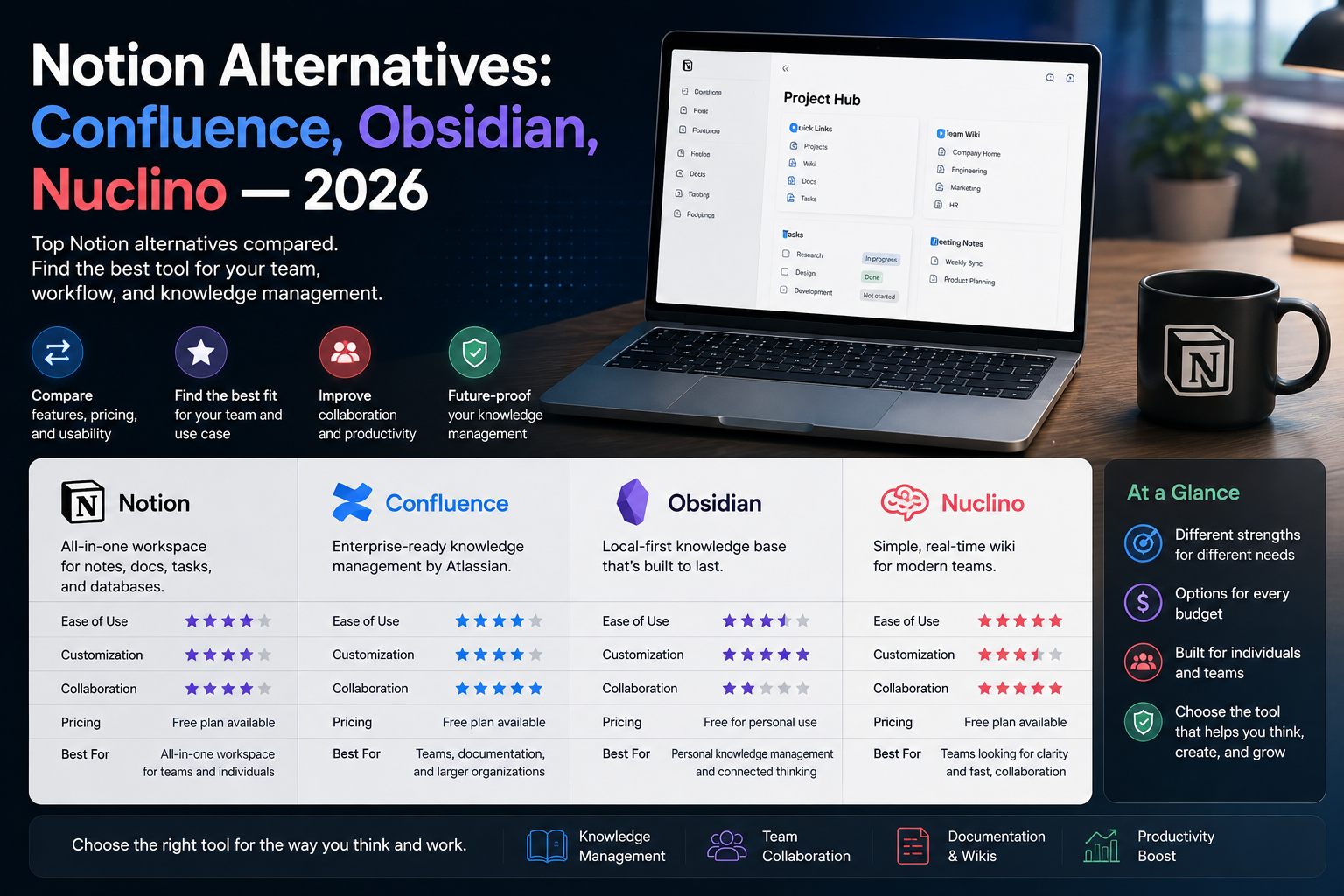
Notion is brilliant until it isn’t. Teams love the all-in-one flexibility right up to the point where the workspace slows to a crawl, the lack of real offline mode bites on a flight, or the endless customization becomes a job nobody signed up for. If you have hit one of those walls and started looking for something better, this guide is for you. We compare the three alternatives teams switch to most — Confluence, Obsidian, and Nuclino — on the things that actually decide the move: price, offline access, performance at scale, and how well each fits a team versus an individual. Each solves a different Notion weakness, so the goal here is not a single winner but the right match for how you actually work.
Quick Answer: The Best Notion Alternative for You
Choose Confluence if you need a structured enterprise wiki with native Jira integration; Obsidian if you want local, offline-first notes you fully own; and Nuclino if you want a fast, minimal team wiki with no learning curve. Confluence starts around $5.42/user, Nuclino around $5/user, and Obsidian is free for personal use.
Why Teams Leave Notion
Notion is a productivity Swiss Army knife — notes, databases, kanban, wiki, and documents in one place. The catch with any multi-tool is that no single blade is as sharp as a dedicated one, and a few specific pain points push teams to look elsewhere.
The two that come up most: no true offline mode and performance at scale. Notion caches pages you have already opened, but creating or editing a document without a connection is not possible — a genuine blocker for anyone working from planes, trains, or unstable networks. And once a workspace passes roughly 5,000 pages, it noticeably slows: search can take three to five seconds and navigation lags, because Notion runs as a single-page app that overloads the browser on large workspaces. Add per-seat pricing that compounds with every hire and customization that becomes a time sink without an owner, and the appeal of a leaner, faster, or more focused tool becomes obvious. If you are leaning toward staying in the Notion family but want a different flavor, our Coda vs Notion comparison covers that split.
Confluence: Best for Structured Enterprise Wikis
Confluence is Atlassian’s enterprise wiki, and it has dominated that space for nearly two decades. Where Notion is flexible and open-ended, Confluence is deliberately structured: governed hierarchies, enterprise permissions, compliance features, and — its biggest advantage — native two-way integration with Jira. For an organization already running the Atlassian stack (Jira, Confluence, Bitbucket), it slots in seamlessly.
Pricing starts around $5.42 per user per month on the Standard plan (billed annually), which already includes unlimited spaces and Rovo AI, though the AI credits are metered — roughly 25 per user each month on Standard, 70 on Premium. For a 20-person team that lands near $100/month, cheaper than Notion at the same headcount. The trade-off: Confluence does less than Notion by design — no flexible databases — and it is more rigid, which is exactly what governed knowledge management teams want. It rates lower than Notion on usability (4.1 vs 4.6 on G2), so it fits structure-first teams, not those who loved Notion’s freedom. For automating flows between Confluence and your other systems, a tool like self-hosted n8n bridges the gaps.
Obsidian: Best for Local, Offline-First Notes
Obsidian is unlike everything else here: it is local-first and offline by default. Your notes live as plain Markdown files on your own device, not in someone else’s cloud. That single design choice solves Notion’s two biggest weaknesses at once — it works fully offline, and there is zero vendor lock-in, because your knowledge is just files you can open in any text editor.
It is free for personal use, endlessly extensible through a huge plugin ecosystem, and treats your knowledge as a personal graph of linked notes rather than a shared team workspace. That is also its limitation: Obsidian is built for individuals first. Real-time team collaboration is not native — teams typically sync via Git or paid add-ons, which suits developers but not a marketing department that just wants shared docs. If you are a writer, researcher, developer, or anyone building a personal knowledge base you want to own outright and use offline, nothing here beats it. If you need many people editing together, look at the two team wikis instead.
Nuclino: Best for a Fast, Simple Team Wiki
Nuclino is the antidote to Confluence’s complexity and Notion’s sprawl. It is a lightweight, fast team wiki with essentially no learning curve — no admin setup, no permission architecture to configure before anyone can start writing. The pitch is simple: your whole team actually uses it, instead of one power user maintaining a workspace while everyone else hunts for the link in Slack.
It is trusted by 12,000+ teams, including names like NASA, Ubisoft, and MIT, and rates 4.7/5 on G2 — the highest of this group. Pricing is approachable: a free tier covers up to 50 items (pages), the Standard plan is around $5 to $6 per user per month, and Premium around $10, so a 20-person team runs roughly $100–200/month. The trade-off is intentional minimalism: Nuclino is pages with text, images, and embeds — no databases, formulas, rollups, or relations. For project management or CRM-like workflows it is too minimal, but for a small team that simply wants a fast shared wiki people will actually maintain, that simplicity is the whole point.
Notion vs Confluence vs Obsidian vs Nuclino
| Factor | Notion | Confluence | Obsidian | Nuclino |
|---|---|---|---|---|
| Entry price | ~$10/user | ~$5.42/user | Free (personal) | ~$5/user |
| Offline mode | No | Limited | Full (local) | Limited |
| Databases | Yes (strong) | No | Via plugins | No |
| Team collaboration | Strong | Strong (governed) | Weak (personal) | Strong (simple) |
| Best for | All-in-one | Enterprise + Jira | Individuals, offline | Simple team wiki |
Other Notion Alternatives Worth Knowing
Confluence, Obsidian, and Nuclino are the three most teams land on, but a few others fit specific needs and are worth a mention so your shortlist is complete:
- Coda (from ~$10/user) — the closest all-in-one rival to Notion, with even more powerful docs-as-apps and automation, though it shares Notion’s tendency to slow down as workspaces grow.
- ClickUp (from ~$7/user) — leans project-management first, useful if your docs live alongside tasks and sprints rather than in a standalone wiki.
- Slite — a clean, Slack-friendly team wiki, a natural pick if most of your team already communicates in Slack.
- Logseq and Anytype — like Obsidian, these are local-first, privacy-focused options for individuals who want ownership and offline access without a cloud dependency.
- Docmost — the strongest free option if you can self-host, with a near drop-in Confluence importer for technical teams.
None of these changes the core decision — they simply widen the field if the main three do not fit, and each is worth a quick trial on its own free tier before you rule it out. For a deeper look at the Notion-versus-Coda question specifically, our Coda vs Notion comparison breaks down where each pulls ahead.
How to Choose the Right One
Pick by the Notion weakness that pushed you to look, not by feature count:
- You need offline access and full ownership: Obsidian. Local Markdown files, no cloud dependency, free for personal use.
- You are a growing company that lives in Jira: Confluence. Structured, governed, and natively integrated with the Atlassian stack.
- You want a fast wiki your whole small team will actually use: Nuclino. Zero setup, no learning curve, low cost.
- You mainly missed databases and flexibility: you may not want to leave Notion at all — the problem might be workspace structure rather than the tool.
If your real goal is a well-organized internal knowledge base rather than a specific app, our guide to structuring a company knowledge base covers the layout and search decisions that matter more than the logo on the tool.
Migrating Off Notion Without Losing Work
Plan the move rather than flipping a switch. Export your Notion pages as Markdown or HTML — Obsidian imports Markdown natively, and Confluence accepts it via import tools. Budget one to three weeks for most workspaces. The biggest thing you lose is databases: a Notion content calendar with filters, views, and automation becomes a static table elsewhere, so teams often rebuild those in a dedicated tool or keep them in a lightweight Notion-as-CRM setup even after moving docs out. The safe approach: migrate one space or team as a pilot, run it for four to six weeks, and only then commit company-wide.
Frequently Asked Questions
What is the best free Notion alternative?
Obsidian is the best free option for individuals — fully free for personal use, offline, and yours to own. For teams, Nuclino’s free tier (up to 50 pages) is the most practical starting point, and Confluence offers a limited free plan for small groups.
Is Confluence better than Notion?
For structured, governed knowledge management and teams already using Jira, yes. For flexible all-in-one workspaces with databases, Notion is better. They optimize for different values, so there is no universal winner — Confluence is cheaper per user and more rigid; Notion is more versatile.
Can Obsidian replace Notion for a team?
Not easily. Obsidian is built for individuals and offline use; team collaboration relies on Git sync or paid add-ons rather than native real-time editing. It is excellent for personal knowledge but a poor fit for a team that needs shared, simultaneous editing.
Why is Notion slow with large workspaces?
Notion runs as a single-page app, so very large workspaces overload the browser client. Past roughly 5,000 pages, search can take several seconds and navigation lags. Tools like Nuclino are built to stay fast at scale, which is a common reason teams switch.
Does Notion work offline?
Only partially. Notion caches pages you have already opened, but you cannot reliably create or edit documents without a connection. If offline work matters, Obsidian — with local Markdown files — is the strongest choice among these alternatives.
Which Notion alternative is cheapest?
Obsidian is free for personal use. Among team tools, Nuclino (from about $5/user) and Confluence (from about $5.42/user) are both cheaper than Notion (from about $10/user), with free tiers to test before you commit.
The Verdict
There is no single best Notion alternative, because each one fixes a different Notion problem. Obsidian wins on offline access and ownership for individuals. Confluence wins for structured, Jira-connected enterprise teams. Nuclino wins for small teams that want a fast wiki everyone will actually use. Start by naming the exact frustration that made you look — slow performance, no offline, too much complexity, or a compounding bill — and pick the tool built to solve that one. Run a short pilot before committing, and you will land on the right move without losing a month of work to the wrong one.