
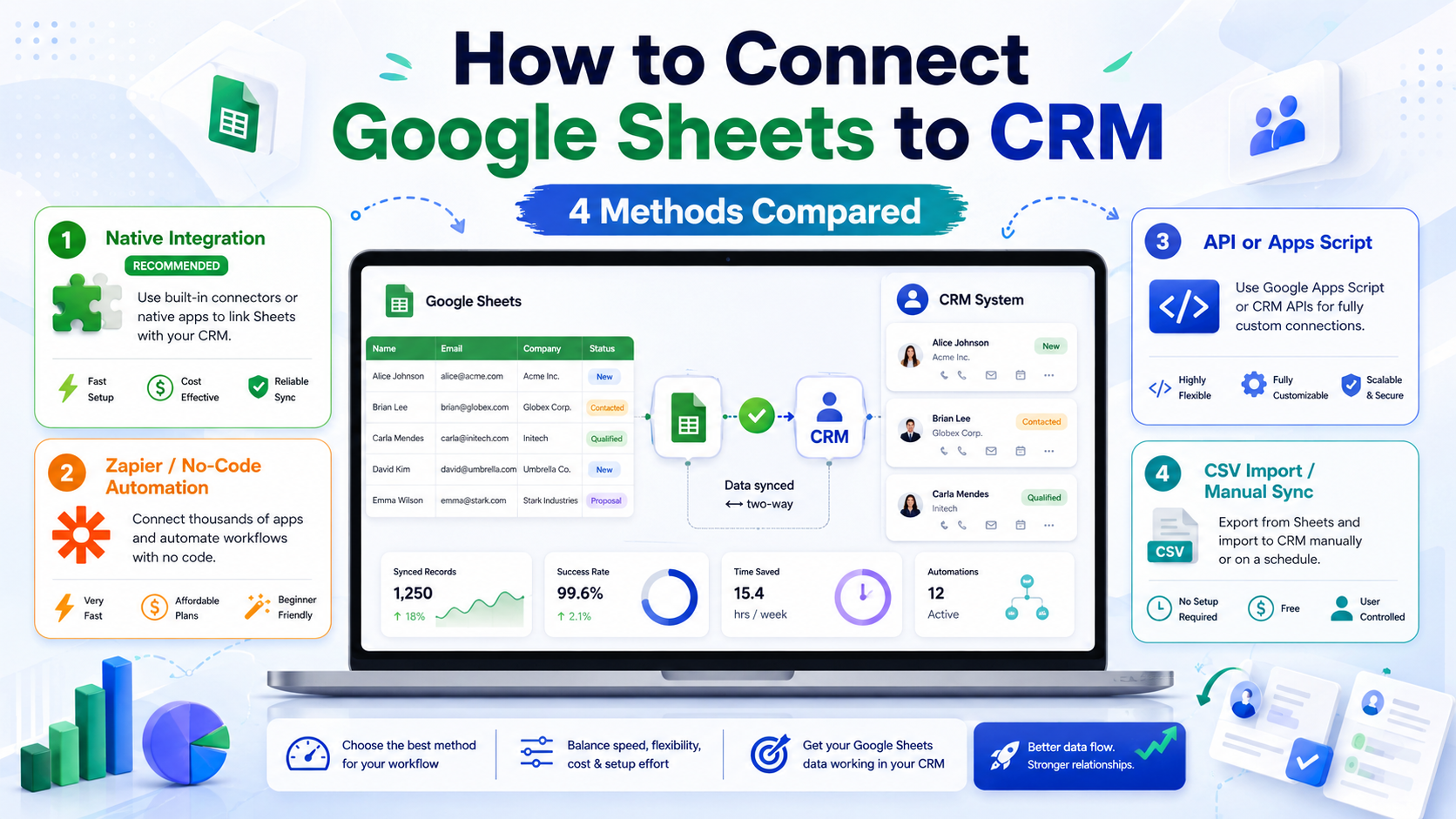
Four real ways to connect Google Sheets to CRM in 2026, ranked by how much engineering they cost: native CRM marketplace integration (fastest, but limited to one direction or paid tiers), automation platform like Zapier, Make, or n8n (most flexible, $0–30/month), Google Apps Script (free, code-required), and custom API integration (most powerful, the most setup time). For most SMBs, the right answer is Make.com or n8n — flexible enough to handle two-way sync, cheap enough to keep on a free or low-paid tier, and not as restrictive as the “native” options that get sold as no-code but often aren’t.
This guide is for SMB founders, ops folks, and growth specialists who treat Google Sheets as a working database — for leads, deals, inventory, or campaign data — and need that data to actually move into the CRM where the sales team lives. We’ll walk through what each method gives you, what it doesn’t, what it costs, and how to pick.
Quick Answer: Which Method to Pick First
If you’re non-technical and only need a one-way push from Sheets into CRM (new row → new contact), use the CRM’s native integration if it exists on your tier — fastest setup. If you need two-way sync, conditional logic, or your CRM’s native option requires a paid Operations Hub, use Make.com on its free plan (1,000 ops/month covers ~300 new contacts). If you have a developer and want zero ongoing cost, write a Google Apps Script that runs on a trigger. If your CRM has a real REST API and you have engineering time, a custom integration is the most reliable for high volume.
Why People Sync Google Sheets to CRM
Google Sheets is the world’s most-used informal database. SMBs collect leads from Google Forms, paste contact lists from events, track pipelines before they buy a CRM, and use spreadsheets as the source of truth for inventory. At some point the team adopts a CRM — HubSpot, Pipedrive, Zoho, or one of the alternatives — and the data lives in two places. Manual copy-paste works for a week before it becomes a daily 30-minute task that nobody owns. The goal of syncing isn’t to replace Sheets but to keep the spreadsheet as the working surface while the CRM holds the canonical record. If you’re still picking the CRM, our roundup of the best CRM for small business in 2026 and the Pipedrive vs HubSpot comparison are good starting points.
Method 1: Native CRM Marketplace Integration
How it works
Most major CRMs ship a “Google Sheets” connector in their marketplace. HubSpot has a Google Sheets workflow action (free tier limited; full two-way sync requires Operations Hub Starter, $20/month). Pipedrive ships integrations through its Marketplace (often third-party connectors like Coupler.io). Zoho CRM uses Zoho Flow. Salesforce has options through AppExchange.
What it’s good at
Setup is the fastest of the four methods — usually 15–30 minutes. The CRM handles authentication, error reporting lives inside the CRM UI, and field mapping uses the CRM’s own property picker. For “new row in Sheet → create contact in CRM,” it’s hard to beat.
Where it breaks
Most native CRM Sheet integrations are one-way (Sheets → CRM) on free tiers. Two-way sync — where edits in the CRM update Sheet rows — is paid Operations Hub on HubSpot and a separate paid connector on Pipedrive. Conditional logic (“only sync rows where status = ‘qualified'”) is often missing. Error handling tends to be silent: failed rows get logged somewhere obscure, not flagged.
Real cost
$0 if the integration is included in your tier. $20–60/month if it isn’t. Watch for “free integration” language — it often means “free if you’re on a paid tier above X.”
Method 2: Automation Platform (Zapier, Make, n8n)
How it works
You build a scenario in Zapier, Make, or n8n: trigger = “new row in Google Sheets,” action = “create contact in HubSpot/Pipedrive/Zoho.” Add filters, transformations, routers, and conditions in between. The platform handles authentication, retries, error notifications, and run history.
What it’s good at
Flexibility. Two-way sync, filtering, transformation (date format, name parsing, deduplication), conditional routing, and notifications all work on one platform. Make Free gives you 1,000 operations a month and real multi-step scenarios; n8n self-hosted is unlimited on a $6 VPS. Most importantly, you can extend the same sync to other systems (Slack alerts, Mailchimp lists, Stripe billing) without rewiring everything. For platform tradeoffs see our breakdown of Zapier alternatives in detail.
Where it breaks
Zapier Free’s 100-task limit and 2-step ceiling make it essentially useless for real Sheet-to-CRM sync — you’ll hit the cap inside a week. Make Free is generous enough for ~300 records/month, but past that you pay. n8n requires a VPS. All three platforms poll Google Sheets every 1–15 minutes (depending on tier), so “real-time” isn’t really real-time. Each new row costs 1–5 operations depending on filters and routes.
Real cost
Make: $0 (Free, ~300 records/month) to $10.59/month (Core, 10k ops). Zapier: $0 (Free, useless) to $19.99/month (Pro, annual). n8n self-hosted: $6/month VPS. For comparison context, see how n8n vs Make stacks up in 2026.
Method 3: Google Apps Script
How it works
Apps Script is Google’s built-in JavaScript runtime, attached to every Google Sheet. You write a function that reads sheet data and POSTs it to your CRM’s REST API. Triggers can be time-based (every 5 minutes), on-edit, or on-form-submit. The script lives inside the Sheet and runs on Google’s infrastructure for free.
What it’s good at
Zero ongoing cost. Full control — anything you can express in JavaScript, you can do. No external service to maintain credentials. Triggers on-edit fire within seconds, so for low-volume sync, it’s faster than polling-based automation tools. Excellent for one-off custom logic (“if column G is yellow and column J starts with ‘EU’, send to European pipeline”).
Where it breaks
Requires code. The CRM’s API quirks are yours to handle — auth tokens, pagination, rate limits, retry logic, signature verification on webhooks (if you’re going two-way), error handling, logging. Apps Script has a 6-minute execution limit per run and a daily quota of about 90 minutes of total runtime on free Google accounts. UrlFetch is capped at 20,000 calls/day. None of this hurts low-volume sync, but a 5,000-row spreadsheet pushed in one batch can hit the limits. For custom API work generally, our piece on webhooks and how to test them covers the patterns you’ll need.
Real cost
$0 forever (assuming you stay under Google’s free quotas). The “cost” is the 4–8 hours of initial coding plus ongoing maintenance whenever the CRM changes its API.
Method 4: Custom API Integration
How it works
You build a small backend service (Node.js, Python, Go — anything) that reads from the Google Sheets API and writes to the CRM REST API, deployed on a VPS, a serverless function (Lambda, Cloud Run), or a container. Triggers are cron, webhook, or both. Logging, retries, and error handling are yours to design.
What it’s good at
Total control. Process tens of thousands of rows reliably, build complex two-way sync with conflict resolution, integrate with multiple CRMs at once, run on your own SLAs. No third-party rate limit between you and the CRM. If you need to dedupe against existing CRM records before insert, transform fields with business logic, or queue retries with exponential backoff, this is the right method.
Where it breaks
Engineering time. A robust integration is 1–3 weeks of work plus ongoing maintenance. Auth management, API versioning, error monitoring, and observability all need attention. If the developer who built it leaves, nobody else on the team can fix it. For most early-stage SMBs, this is overkill — by the time you actually need the control, you can afford an automation platform with Pro features. For tools that help build and test such integrations, our roundup of Postman alternatives and no-code API tools is the right next read.
Real cost
$5–20/month hosting (VPS or serverless), plus 20–80 hours of engineering for the initial build, plus 2–5 hours/month of maintenance. Realistic total in year one: $500–2,000 in time-equivalent cost, even with cheap hosting.
Side-by-Side: All 4 Methods Compared
| Method | Setup time | Monthly cost | Two-way? | Best for |
|---|---|---|---|---|
| Native CRM integration | 15–30 min | $0–60 | Often paid | Simple one-way push |
| Automation platform | 30 min – 2 hr | $0–30 | Yes | Flexible logic |
| Apps Script | 4–8 hours | $0 | Yes (build it) | Code-comfortable founders |
| Custom API | 20–80 hours | $5–20 | Yes (build it) | High volume / complex |
Real Use Cases: Which Method Fits Which Job
“My intern adds 20 leads per day to a sheet.” Native CRM integration if free on your tier, otherwise Make Free. Setup in under an hour, no code.
“I have 5,000 historical leads to push once.” Use the CRM’s CSV import — don’t build an integration for a one-time job.
“Sales updates deal status in HubSpot, I want the Sheet to reflect that.” Two-way sync — Make.com or n8n. Native HubSpot ↔ Sheets two-way needs paid Operations Hub. On HubSpot Free you’ll feel the constraint of HubSpot’s limits versus alternatives.
“500 rows/day from form intake, with conditional routing by country.” Make.com Core or n8n. Apps Script will hit quota within months; native integration won’t filter.
“50,000 records/day from multiple sheets into multiple CRMs.” Custom API. Anything below this scale doesn’t justify the build.
Pitfalls Common to All Methods
Duplicates. Re-running a sync can create duplicate contacts. Always use an email or external ID as the dedupe key on the CRM side. Most CRMs support “upsert” — update if exists, insert if not — but you have to configure it.
Field mismatches. Google Sheets stores everything as a string. CRM properties have types. A blank cell isn’t null. Date “5/4/2026” is ambiguous (May 4 or April 5?). Build a transformation step.
Rate limits. Both Google Sheets API and your CRM have rate limits. Bulk operations need batching and exponential backoff.
Auth expiry. OAuth tokens expire. Native integrations refresh silently; custom code has to handle refresh logic. The first sign of expired auth is a sync that silently stops working — set up failure notifications.
Decision Framework
Use native CRM integration if you need a one-way push, your team is non-technical, and the integration is included in your CRM tier. Don’t pay for Operations Hub just to sync Sheets.
Use Make.com or n8n if you need two-way sync, conditional logic, transformation, or you want to extend the sync to additional systems (Slack, email, billing). Most SMBs land here.
Use Apps Script if someone on the team writes JavaScript and the volume is under ~1,000 rows/day. Free, fast, and the code lives with the Sheet.
Use a custom API integration if volume is genuinely high (10,000+ rows/day), you have engineering capacity, and you need control over retry logic, observability, and SLAs. Anything below this and you’re over-engineering.
Conclusion
For most SMBs in 2026, the right way to connect Google Sheets to CRM is Make.com on its free tier — two-way sync, conditional logic, and transformations without paying for Operations Hub or writing code. Native CRM marketplace integrations are tempting because they’re fast, but the limits show up within weeks: one-way only, no filtering, or paid tier required. Apps Script wins if you have a developer; custom API wins only at real scale. Start with the simplest method that fits, build one sync, and let it run for two weeks before adding the next.
FAQ
Can I connect Google Sheets to a CRM for free?
Yes — Make.com’s free plan (1,000 operations/month) handles around 300 row syncs per month at no cost. Google Apps Script is also free if you write the code yourself.
Does HubSpot integrate with Google Sheets natively?
Yes, but full two-way sync requires HubSpot Operations Hub Starter ($20/month or higher). The free CRM tier offers basic Google Sheets workflow actions, but they’re one-way and limited. For two-way sync on the free HubSpot tier, use Make.com or n8n as a workaround.
What’s the difference between one-way and two-way sync?
One-way sync pushes data from Sheets to CRM (or vice versa). Two-way sync updates both sides whenever either changes — edit in CRM, the Sheet updates; edit the Sheet, the CRM updates. Two-way is more useful but harder to set up because of conflict resolution: if both sides change the same record at the same time, which wins?
Is Google Apps Script reliable for production CRM sync?
Yes for low-to-mid volume (under 1,000 rows/day). Apps Script has a 6-minute execution limit and around 90 minutes total runtime per day on free accounts. For higher volume or critical syncs, an automation platform gives you better observability and retries.
How long does it take to set up Sheets-to-CRM sync?
Native integration: 15–30 minutes. Automation platform (Make/n8n/Zapier): 30 minutes to 2 hours including field mapping and testing. Apps Script: 4–8 hours including testing. Custom API integration: 20–80 hours for a production-grade build.
Which method is best for syncing 10,000+ rows per month?
Make.com Core ($10.59/month for 10,000 operations) or n8n self-hosted (unlimited on a $6 VPS) is the sweet spot. At 50,000+ rows/month or with complex business logic, a custom API integration starts to make sense — but for most SMBs even at 10k/month, an automation platform is more cost-effective than building from scratch.